Settings
Click the gear in the left sidebar, change the fields you need and click Save. On a phone, open the side menu first.
Settings apply throughout the application and sync with your account. The badge next to the heading shows the sync status.
The EN / RU switch changes the language immediately; no separate save is needed.
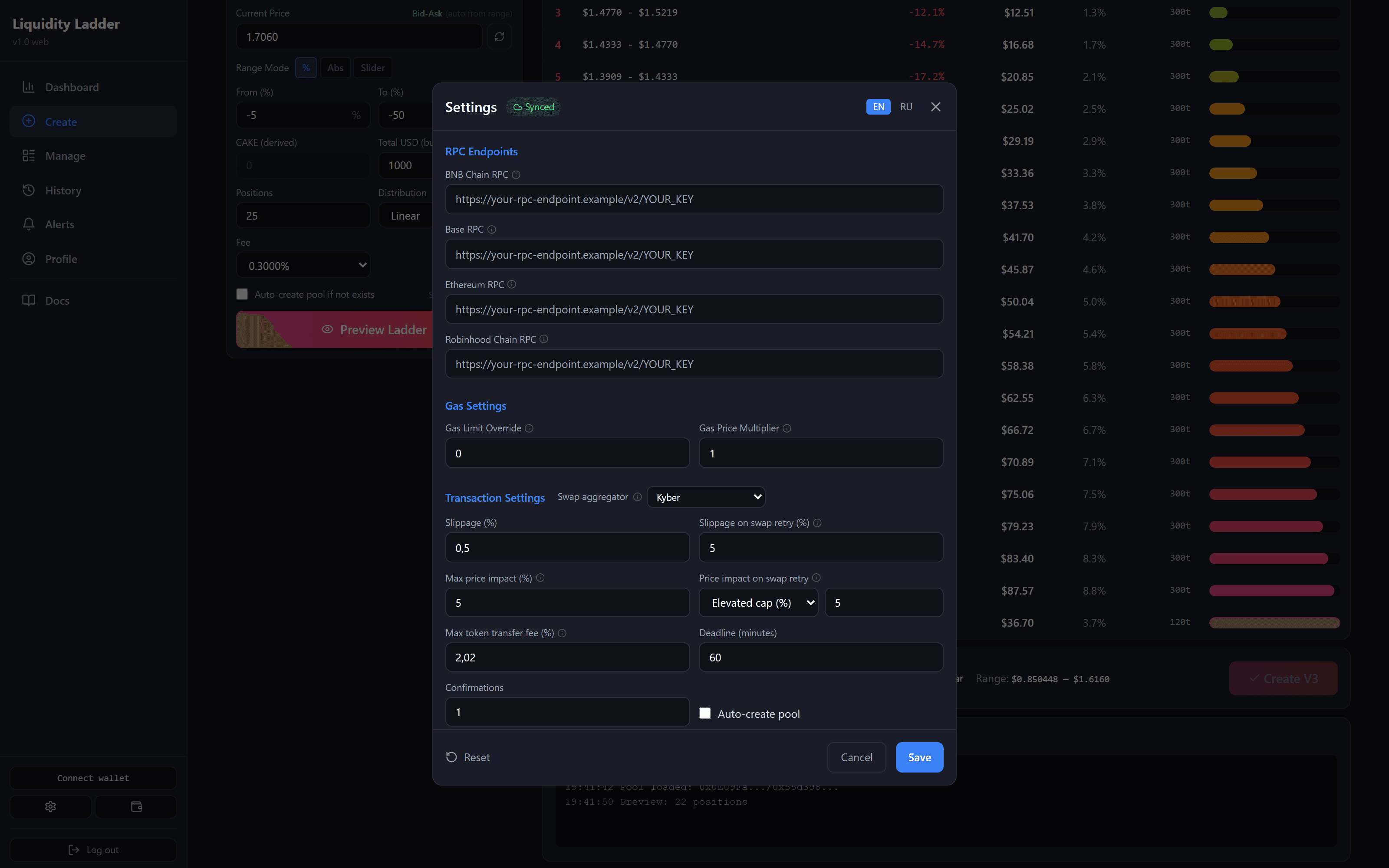
RPC Endpoints
An RPC node connects the application to a network. You can enter your own address for BNB Chain, Base, Ethereum or Robinhood Chain.
This can help if the default node responds slowly or limits requests. An empty field uses the default node; its address appears in the placeholder.
Gas Settings
- Gas Limit Override — set the gas limit manually. 0 determines it automatically.
- Gas Price Multiplier — multiply the gas price. 1.0 leaves it unchanged; 1.2 raises it by 20%. This increases the gas cost and may help transaction priority, but does not guarantee fast confirmation.
Transaction settings
Swap aggregator
Selects the service used for close-and-swap and the Sell button. Zap has its own aggregator setting further down this page.
| Value | How it works |
|---|---|
| Auto (recommended) | Uses Kyber where available, including Robinhood Chain |
| Kyber | Uses Kyber |
| Relay | An alternative on Robinhood Chain |
| Matcha (0x) | Available on every network; select it manually |
Matcha provides neither a USD value estimate nor a price-impact figure. Max price impact does not apply to it. Instead, the application compares the exchange rate with the deepest pool’s on-chain price. If that price cannot be read, the swap is rejected. This check uses a wider tolerance than the ordinary price-impact limit.
Slippage and bad-price protection
- Slippage (%) — how much the price may worsen between calculation and execution. A higher tolerance makes execution easier in a moving market, but allows a less favourable swap.
- Slippage on swap retry (%) — a separate tolerance for retrying a swap. The default is 5%. Changing it does not change ordinary Slippage.
- Max price impact (%) — limits the swap’s own effect on the price. A swap above this limit is rejected. The default is 5%; 0 disables the check.
- Price impact on swap retry — the limit for a retry. Select Elevated cap (%) and enter a value, or Ignore (no check).
Max token transfer fee (%)
Some tokens deduct a fee on transfer. A V4 pool may then receive fewer tokens than it needs to create the positions.
If creation fails for that reason, the application can retry with smaller positions, allowing for a transfer fee up to this limit. Unused funds return to your wallet in the retry transaction.
This setting only applies after that kind of failure. The default is 2.02%, the maximum is 10%, and 0 disables this retry method.
The rest
- Deadline (minutes) — how long the operation remains valid for execution. Once it expires, a new calculation is needed.
- Confirmations — how many network confirmations to wait for.
- Auto-create pool — create a pool if the selected pool does not exist.
Turning confirmations off
Both switches are off by default:
- Skip the new-pool confirmation — remove the extra question before creating a new pool.
- Skip the wrong-price pop-up — remove confirmation for a price deviation greater than 15%. The warning beside the price stays visible.
With new-pool confirmation disabled and Auto-create pool enabled, the application can create a pool at your price without asking again. Check the price before submitting.
Defaults
These values are filled in on Create:
- Position count — the number of ladder rungs.
- Distribution type — Linear, Quadratic, Exponential or Fibonacci.
- Currency display — USD or the network’s native token.
- How to pay for a ladder — Match the pool (default) or Always pay ETH / BNB. The second option lets you use ETH/BNB for WETH/WBNB-quoted pools on Uniswap V4: wrapping happens on creation and unwrapping on close. It does not apply to PancakeSwap V4 or stablecoin-quoted pools.
- Swap tokens on close — enable swapping by default when closing positions.
- Skip the swap preview — hide the swap calculation before confirmation.
APE
- Market APE — recalculate the ladder from the current pool price before submission.
- Market APE for Zaps — enable that recalculation for Zap In. This is separate from ordinary creation.
- Max price drift before cancel — cancel creation before signing if the price has moved further than this percentage. No creation gas is spent in that case.
- Hide APE IN presets on Create — remove the preset row and the APE button.
A drift of 0% disables the limit: a price move will not cancel creation. See Market APE.
Display
- Enable vol/vol pools (WBNB/WETH-quoted) — include WBNB- and WETH-quoted pairs, such as MEME/WBNB, in search. On by default. Enter prices and volume in USD; the application converts them to the pair’s quote token.
- Hide the Cumulative PnL chart — remove the large cumulative-PnL chart from the Dashboard. The other cards stay.
- Hide the pool chart on Create and Manage — remove the candle chart. The rung table stays open on Create, and the chart opener disappears from Manage. The chart is not hidden by default.
- Pool chart opens on — select the starting timeframe: 1m, 5m, 15m, 1h, 4h or 1d. The default is 1m. Switching timeframes on the chart does not change this setting.
- Create new pools with the Liquidity Ladder hook — apply the hook when creating a new pool. Existing pools are unaffected. Migrate does not support hooked pools.
2FA (two-factor authentication)
This section is only available in the private version. Liquidityladder.app uses wallet-signature sign-in.
To set up 2FA, add the account to an authenticator app using the QR code and save the backup codes. The second factor adds protection alongside your password.
Zap
Settings for entering with one token. See the Zap guide for the steps.
- Enable Zap — show Zap In on Create when this entry method is available for the selected pool.
- Primary / Fallback aggregator — the main and backup swap service: Kyber or Matcha (0x). The backup is used if the primary is temporarily unavailable or cannot find a route. None disables the backup.
- Entry currency (wrapped-native pools) — use ETH / BNB with automatic selection, or use WETH / WBNB.
- New-pool starting price — enter a price manually or use the aggregator quote. Only applies when creating a new pool.
- Zap slippage (%) — Zap’s slippage tolerance, from 0.1% to 20%. The standard value is 5%. A higher tolerance allows less favourable execution.
- Stale-quote threshold (%) — how far the price may move before you need to refresh the calculation. Range: 0.5–20%.
- Mint headroom (%) — a reserve above the amount for creating positions, from 0% to 20%. For example, 100 USDT with 2% headroom requires 102 USDT on your balance. Unused funds return to your wallet. 0% keeps a strict cap with no reserve.
- Zap max price impact (%) — reject quotes with price impact above this limit. 0 disables the check. This is a separate field and does not change the swap-on-close limit.
- Extreme preset — a second set of tolerances for slippage, quote freshness, headroom and price impact. Select it with Normal / Extreme above Zap In.
- Skip the confirmation dialog — proceed to signing as soon as you click Zap In. This skips the quote review dialog and its freshness check.
Choose different primary and fallback aggregators: asking the same service again does not provide a backup route.
Your saved tolerances may differ from the standard values. Check them before using Extreme or raising limits: a higher tolerance allows a larger deviation, but does not guarantee successful execution.
Migrate
Settings for moving a ladder to another pool:
- Price-band tolerance (%) — the allowed price difference during the move.
- Max mint drift (%) — a reserve for price movement when creating new V4 positions. Applies to rungs near the current price. A smaller reserve leaves less dust in your wallet but increases the risk of failure on a sharp move.
- Fees on migrate — add collected fees to the new ladder (Compound into new ladder) or send them back (Return to wallet).
- NFT approval — allow the contract to work with all positions (Approve all (one-time)) or approve each position separately (Per-token (tighter)).
Custom Distributions
Save your own allocation of funds between rungs under a name. It appears on Create under Distribution → My Presets.
Advanced
Enable debug logs in the console shows detailed messages in the browser console. This helps when investigating problems with support.