History (the History page)
Two tabs: Transactions — the log of every transaction; PnL — analytics on closed trades, with a calendar and a per-token breakdown.
The Transactions tab
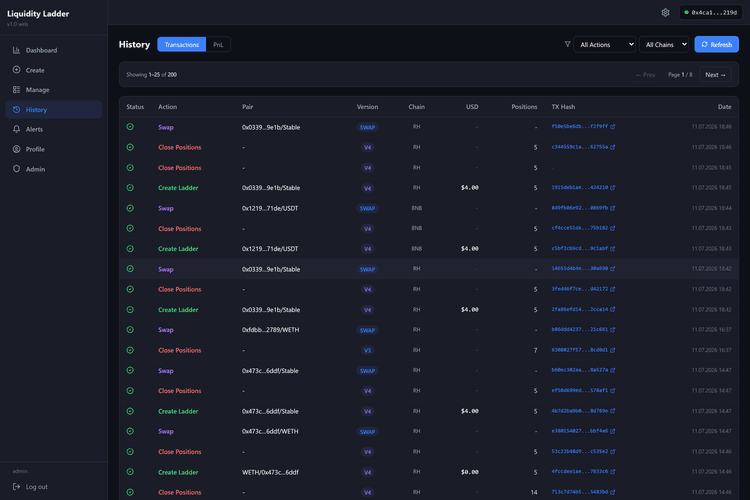
A log of every action: Zap In, Create Ladder, Collect Fees, Batch Collect, Close Positions, Swap, Approve.
- Filters: by action (All Actions) and by network (All Chains), plus a “Refresh” button.
- Columns: Status (✓ confirmed / ✕ failed / ⏱ pending), Action, Pair, Version, Chain, USD (for closes, the amount and the PnL), Positions, TX Hash (a link to the explorer), Date.
- Clicking a row opens a details window: token addresses, DEX, fee tier, the full hash, minted Token IDs for a Zap, and for closes a PnL block (invested/received/PnL, close price, swap) with an “Open PnL card” button. Failed transactions show the full error text.
- Pagination is ”← Prev” / “Next →”, 25 rows at a time.
The PnL tab
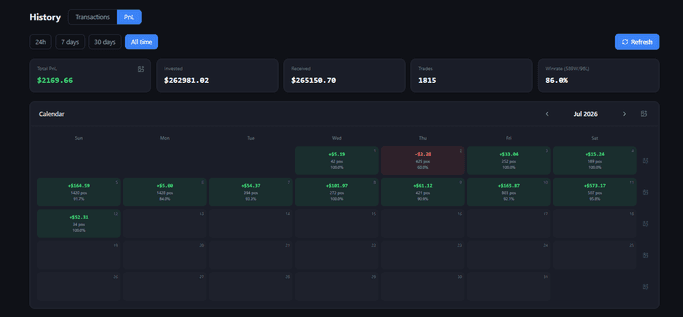
Analytics on closed trades over a period, selected with the “24h” / “7 days” / “30 days” / “All time” chips.
- Cards: Total PnL, Invested, Received, Trades, Winrate.
- Calendar — a calendar of daily PnL: each cell carries the amount, the number of positions and that day’s win rate. The arrows page through months.
- PnL by Token — a summary per token (click a heading to sort; clicking a token copies its contract address).
- Closed Trades — the closes within the period.
Nearly every row, and every day, week and month in the calendar, carries a PnL card icon — it opens an image of the result that you can copy or download (Copy / Save).