Parameters and other creation scenarios
For your first ladder, start with the main guide. Use this reference to look up a field or choose another creation method.
Loading a pool by address
Paste a V3 pool address or V4 pool ID and press Load. After loading, check the pair, network and Current Price.
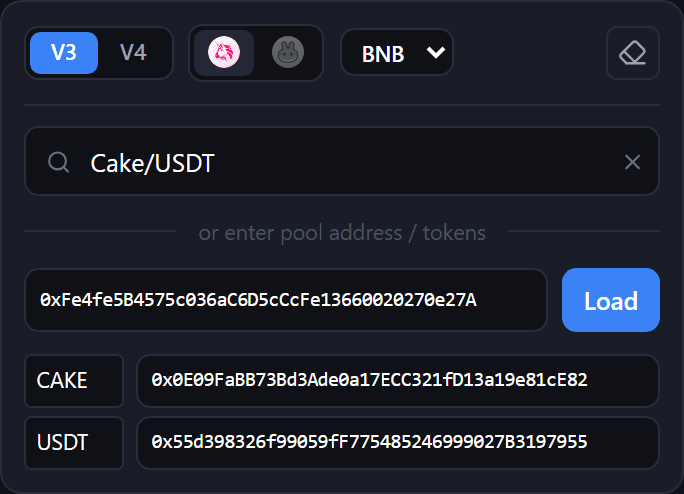
Token search also shows liquidity, fees and hourly volume. An empty volume means no data; zero means no trades in that hour. To hide WETH/WBNB pairs, turn off Enable vol/vol pools in settings.
Position types
The selected range determines the ladder type.
| What you want | How to set it |
|---|---|
| Two-sided ladder | Upper bound above the current price, lower bound below it. For example, From = 20, To = -50 |
| One-sided ladder (Bid-Ask) | The whole range below the current price or starting at it. For example, From = -5, To = -50 |
| One wide position | Set the range and Positions = 1 |
The numbers illustrate the fields, not a recommended strategy. The single wide position is called Spot here; it is a liquidity position, not an ordinary token purchase.
In the preview, BID labels rungs below the price and ASK labels those above. For a two-sided ladder, check both totals and the token amounts needed.
Range modes
| Range Mode | How to set the bounds |
|---|---|
| % | From and To are percentage offsets from the current price |
| Abs | Upper Price and Lower Price are specific prices |
| Slider | Move the two handles and check the resulting bounds |
You can also drag a bound on the chart with a mouse or finger. Dragging switches to Abs, fixing the prices of the bounds.
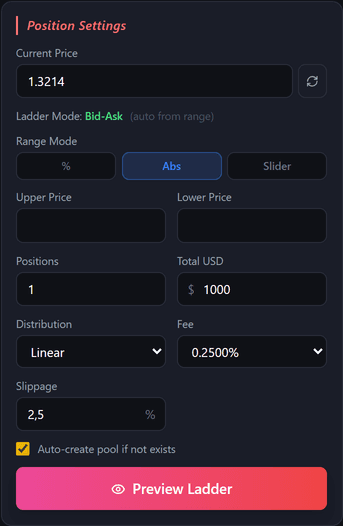
Choosing another pool, pressing Load, changing the network or clearing the pool switches Abs back to %. Check the range after these actions. APE IN presets also select percent mode; Slider survives a pool change.
Rung count and amount distribution
Positions allows 1 to 50 positions. More rungs mean more work when creating and closing the ladder, which can increase gas costs.
Distribution changes the share of the amount allocated to each rung:
- Linear, Quadratic, Exponential, Fibonacci are different distribution profiles. Compare their amounts and percentages in the preview table.
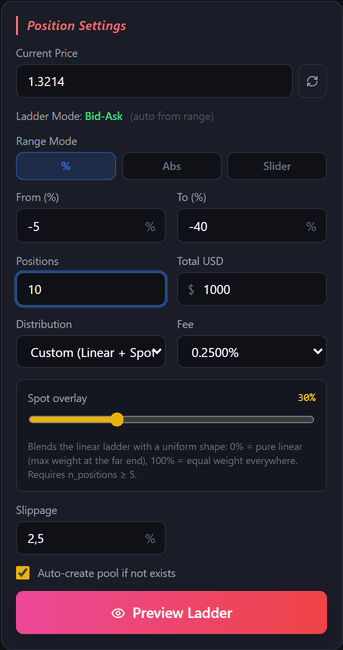
- Custom (Linear + Spot) blends a linear profile with equal shares. Spot overlay = 0% keeps the linear profile; 100% gives equal shares. Available with Positions ≥ 5.
- My Presets contains distributions saved in Settings.
Field reference
| Field | Meaning |
|---|---|
| Current Price | The price used to calculate the ladder. Press ↻ to refresh it from the pool |
| Total USD | The total amount in dollars |
| Fee | The pool fee, not the service fee. Changing it selects a different pool |
| Tick Spacing | The spacing of allowed V4 price boundaries. Keep Auto for a loaded pool |
| Slippage | Allowed price slippage, in percent |
| Auto-create pool if not exists | Allow a missing pool to be created — separate guide |
Reopening Create refreshes the price from the pool. If that fails, press ↻ and check the calculation. The eraser clears the pool, tokens and price, keeping the amount, rung count and distribution settings.
Paying for a ladder
In How to pay for a ladder:
- Match the pool uses the selected pool’s tokens.
- Always pay ETH / BNB wraps ETH/BNB on creation and unwraps on close for Uniswap V4 pools paired with WETH/WBNB.
This setting does not affect PancakeSwap V4 or stablecoin pairs. Check the required tokens and amounts before sending.
Pool chart and table
Pool price shows the token’s dollar price, candles and volume. It appears for a loaded pool when data is available. A pool that has not been created yet has no chart.
| Action | How |
|---|---|
| Change candle period | Select 1m, 5m, 15m, 1h, 4h or 1d |
| Change the ladder range | Drag its upper or lower line; on a phone, drag vertically |
| Adjust the price scale | Drag the price axis or scroll over it |
| Reset the scale | Press A or double-click the axis |
| Use a logarithmic scale | Press L |
| Show or hide rungs | Toggle Ladder |
| See a rung’s amount | Hover over its bar |
| Expand the table | Press the arrow in the summary row |
| Collapse the chart | Press the Pool price title |
Bars on the right show liquidity across price ranges. Their tooltips show the rung number, range, amount and share of the ladder. FULL RANGE hides range lines and rung bars.
The table is usually folded while the chart is open; you can expand it manually. If the chart fails to load, the calculation remains available in the table.
Loading chart… means loading. For No chart data for this pool, try a longer candle period. For Couldn’t load chart, press Retry. Missing candles alone do not mean the pool does not exist.
Choose the starting candle period or hide the chart in Settings.
Restrictions on V4 pools with hooks
A hook is an additional contract that can change how a pool works. Check its warning before creating positions:
| Message | Meaning |
|---|---|
| Hook: affects swaps/fees only | The hook affects swaps and fees |
| Hook can block withdrawals | It may block withdrawals; a check and your consent are required |
| Hook can take funds | It may take funds on deposit or withdrawal; creation is disabled |
If the withdrawal check fails to run, press Retry withdrawal check. A failed check is neither a successful check nor proof that withdrawals are blocked. Changing the pool or wallet requires consent again.
Market APE
Market APE IN calculates the ladder from the pool price at send time. It skips the preview, so the result may differ from what you saw earlier. Enable it in Settings; it works with percentage ranges.
Max price drift before cancel limits the allowed price movement. If exceeded, creation stops before signing. 0% disables this protection; it does not require an exact price match.
Market APE for Zaps sets this behaviour separately for Zap In. You can hide the APE preset row in settings.